Type the bank name, then choose its state to see the routing number
Loading the official preview database…Preparing current active institutions and primary ABA numbers.
Use for
Not sure where the account started? Leave state blank and type the bank. Suggestions will show the available states. Ready to search
Selected bank routing
Type a bank name and choose a bank + state option.
0 RESULTS
Choose the closest bank and stateThe routing number appears after you choose an option. You will see one number unless that bank has multiple records in the same state.
Schedule
Meetings, client callbacks, and device reminders
Enable notifications on every device where you use Rizen.
Sun
Mon
Tue
Wed
Thu
Fri
Sat
Rizen Dialer CRM
Upload leads and start printing
0calls today
Daily pace0 dials
Top objection todayNo objections logged
Choose an objection after each conversation to build your daily review.
Recommended coachingKeep dialing
Recommendations update from today’s objection totals.
Lead category
25 dials complete — swap your number
Take a quick pause and rotate to your next outbound number before continuing. This reminder helps build the habit and reduce spam-label risk.
Upload Leads
Choose the import method and the Lead Type shown on every imported contact.
The Lead Type is attached to every imported contact. On the next screen, Rizen will suggest matches for your columns and let you correct them before anything is saved.
Match your columns
Preview
Review the matches above. Phone or email is required for each contact.
Complete This Sale
Confirm the sale details before it is added everywhere.
ClientSold deals automatically update Sales Manager, Pay Calendar, your dashboard, and agency notifications.
Sale details
Review customer and policy information
—
Choose a carrier and product to calculate the agent payout. The sale can still be saved and completed later in Sales Manager.
Payment details
Everyone paying on this day
Day total$0.00
Schedule Event
Add a callback or meeting to your calendar
Choose a state to convert this appointment to your calendar time.
Personal Dashboard
Annualized premium production
Overview
🏆 Agent Leaderboard
🏢 Agency Team Leaderboard
⚠️ Recent Chargebacks
📋 Recent Policies
Pay Tracker
Add a new policy
Add New Policy
Age:
Enter a contract level (such as 90), not a commission percent. ProTrack converts it to the product's true commission percent.
Payout PreviewSelect carrier, product & premium
Total Commission
-
Advance (75%)
-
Back-End (25%)
-
Gateway CSV Uploads
Drop Gateway CSV here or click to upload
Weekly IP report — uploads appear in IP Reports tab
No uploads yet
Chargeback Tracker
Monitor lapsed policies and agent debt
All Chargebacks
Team IP Owner pilot
Weekly Gateway personal-team production for active Rizen agents only
Weekly history
Carrier Pay Owner pilot · my data
Actual statement transactions and deposits retained by month
Agent totals by carrier
12-month payment history
Where to download carrier statements
Use each carrier's official producer portal. Download CSV when offered; if the portal supplies Excel, save the statement as CSV before importing. A PDF-only statement will need a carrier-specific importer after we test a real sample.
Commissions → Commission Statements → choose statement date
Statement Audit Owner pilot · my data
Who was paid, who still needs verification, and who charged back
Book of Business Owner pilot · my data
Every deal by agent, reconciled against carrier statements
Pay Calendar
Your personal payouts
Sun
Mon
Tue
Wed
Thu
Fri
Sat
Yearly Profitability
Your personal monthly breakdown
Birthday CRM
Client & beneficiary birthdays
Add Client
Clients
SMS Alerts
Powered by Twilio
Not connected
Twilio is configured securely by an administrator. Credentials are never entered in the browser.
🎂 Birthday Message
⚠️ Chargeback Alert
Send Today's Birthday SMS
Manage Agents
Add and manage your team
Add New Agent
A one-time setup code is created automatically when you add an agent. Give it to them so they can create their PIN.
All Agents
Dashboard
Your production and agency rankings
Overview
📋 Recent Policies
Submit a Deal
Enter your policy details below
New Policy
Age:
Your PayoutEnter carrier, product & premium
Total Commission
—
75% Advance
—
25% Back-End
—
Rate is automatically calculated from the FFL pay scale based on your contract level.
My Submitted Deals
My Pay Calendar
Policy earnings, expected deposits, and confirmed carrier pay
Sun
Mon
Tue
Wed
Thu
Fri
Sat
My Yearly View
Monthly profitability breakdown
Sales Manager
Your personal deals · grouped by effective month
Import previous sales
Upload a CSV, review the match, then add the history.
Historical rows must include a date before the current month. They never inflate today's leaderboard. Agent-specific Investment equations begin only after real lead spend is imported or logged—no spend means no projected ROI.
Review previous sales
Rizen matched the sheet. Confirm the mapping and fix only the highlighted rows.
1. Auto-matchColumns are detected from common sales-sheet labels.
2. Clean exceptionsEdit only blocked rows or adjust a mapping once.
3. Connect the mathHistory flows into production, payouts, and projections.
Column mappingEach choice shows only the example from line 2. Line 1 is used behind the scenes to match the columns.
Edit Policy
Total Comm.
—
Advance (75%)
—
Back-End (25%)
—
Personal Dashboard
Your annualized premium production
Overview
🏆 Your Team
📋 Recent Policies
Submit a Deal
Enter your policy details
New Policy
Age:
Your PayoutEnter carrier, product & premium
Total Commission
—
75% Advance
—
25% Back-End
—
My Submitted Deals
Pay Calendar
Your personal payouts
Sun
Mon
Tue
Wed
Thu
Fri
Sat
Yearly View
Your personal monthly breakdown
My Agents
Agents you have onboarded
Add New Agent
A one-time setup code is created automatically. Give it to the agent so they can create their PIN.
My Team
IP Reports
May 2026 — Leaderboard
No reports uploaded yet
Upload your Gateway CSV in the Pay Tracker tab
IP Reports
May 2026 — Leaderboard
IP Reports
May 2026 — Leaderboard
Sales Manager
Your clients · grouped by effective month
Import previous sales
Upload a CSV, review the match, then add the history.
The person signed in is used for blank or unmatched agent rows. Historical dates stay out of the current-month leaderboard while still feeding past performance and projections.
Edit My Policy
Total Comm.
-
Advance
-
Back-End
-
Sales Manager
Your clients · grouped by effective month
Import previous sales
Upload a CSV, review the match, then add the history.
The person signed in is used for blank or unmatched agent rows. Historical dates stay out of the current-month leaderboard while still feeding past performance and projections.
Team Leaderboard
Client folder
Policy details
Deal flags
Client & policy information
Total commission—
Advance (75%)—
Back-end (25%)—
Client notes
Notes stay with this client record.
Agent Performance
Gross and net profit by agent
Agent Breakdown
Team Performance
Your team gross and net profit
Agent Breakdown
License Manager
View and manage agent state licenses
My Licenses
Your state licenses and renewal tracker
My Licenses
Your state licenses and renewal tracker
Carrier Hub
Portals, e-apps, and e-signature guides — one click each
Carrier Hub
Portals, e-apps, and e-signature guides — one click each
Carrier Hub
Portals, e-apps, and e-signature guides — one click each
Investment
Make smarter decisions with the money you put back into production
Log lead spend
Lead economics
Lead ROI Calculator
See lifetime lead spend and the return your own Sales Manager history suggests.
Lead spend historyLast 6 weeks
Lifetime lead spend$0.00
Graph setting
What is your minimum weekly lead spend?
A dashed line will mark the amount you do not want to fall below.
Spend vs. commission over timeHover either line to see what it means and view each period's value.
Lead spendFull commission
Advance net uses the 75% advance shown in Sales Manager. Full commission net includes the remaining 25% back end. Both subtract the typical lead spend for the selected period and are planning estimates, not guarantees or carrier payment statements.
Personal projection
Lead Spend & AP Planner
Use imported sales and lead costs to project AP, commission, or the lead budget needed to reach a target.
Start with
View
Desired weekly lead spend
$
Enter the amount you want to invest in leads in a typical week.
Lead-spend historyDetailed purchase record
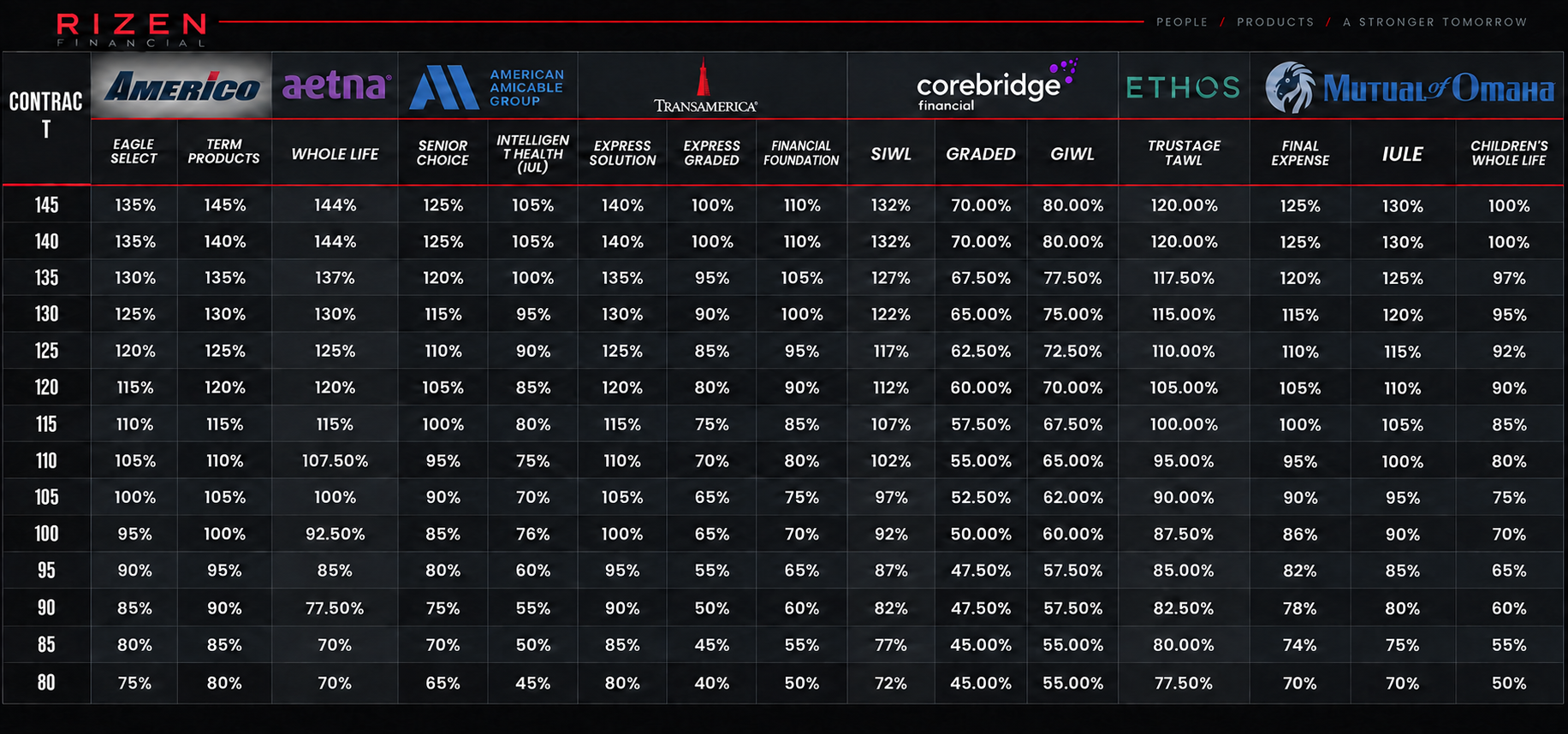
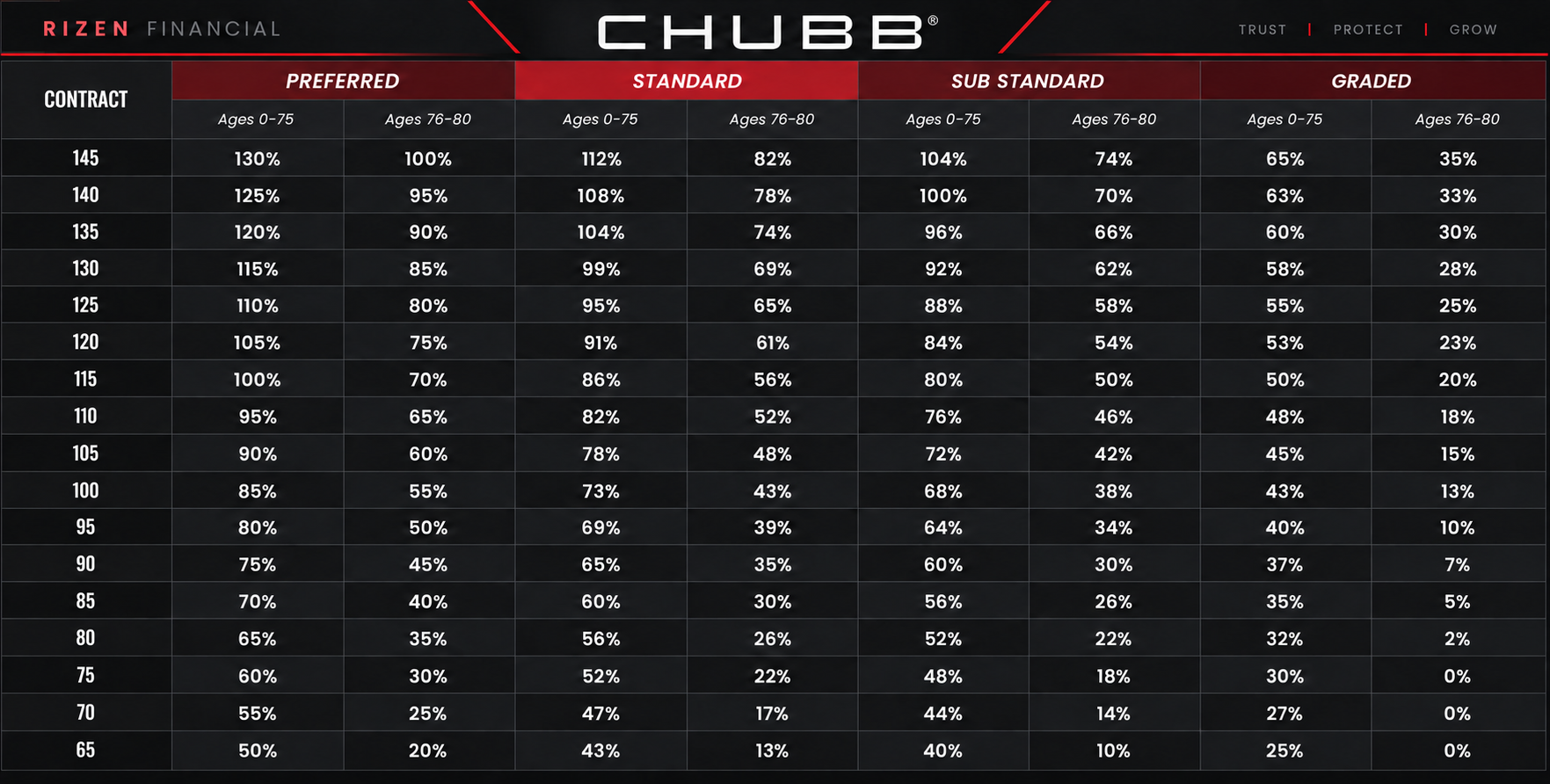
Compensation Grids
Carrier commission reference by contract level
Americo Compensation Grid
Scroll horizontally on smaller screens to view every product.